

To filter tech job listings, match each role’s responsibilities and skills with your priorities instead of relying on job titles alone.
A useful service explains why a role appears in your results, so you can assess the fit and decide which openings merit a closer look.
This guide covers role matching, application preparation, and Android-based job discovery, while keeping the decisions in your hands.
Key Takeaways
- Map your skills to the work you want to do, not just the title attached to a role.
- Shape your resume and application answers around the role’s requirements while keeping your experience accurate.
- Use job discovery and tracking tools to keep relevant roles organized and decide which ones deserve your attention.
- Look for clear match explanations and employer-posted roles so you can judge how each listing fits your priorities.
How a Job-Matching Service Filters Tech Job Listings
A job-matching service narrows tech listings by comparing role requirements with your preferences. It can screen for title, location, compensation, and tech stack, then rank roles that meet those filters. According to the U.S. Bureau of Labor Statistics, the number of job openings was 7.5 million in September. That figure covers all industries, not tech jobs alone.
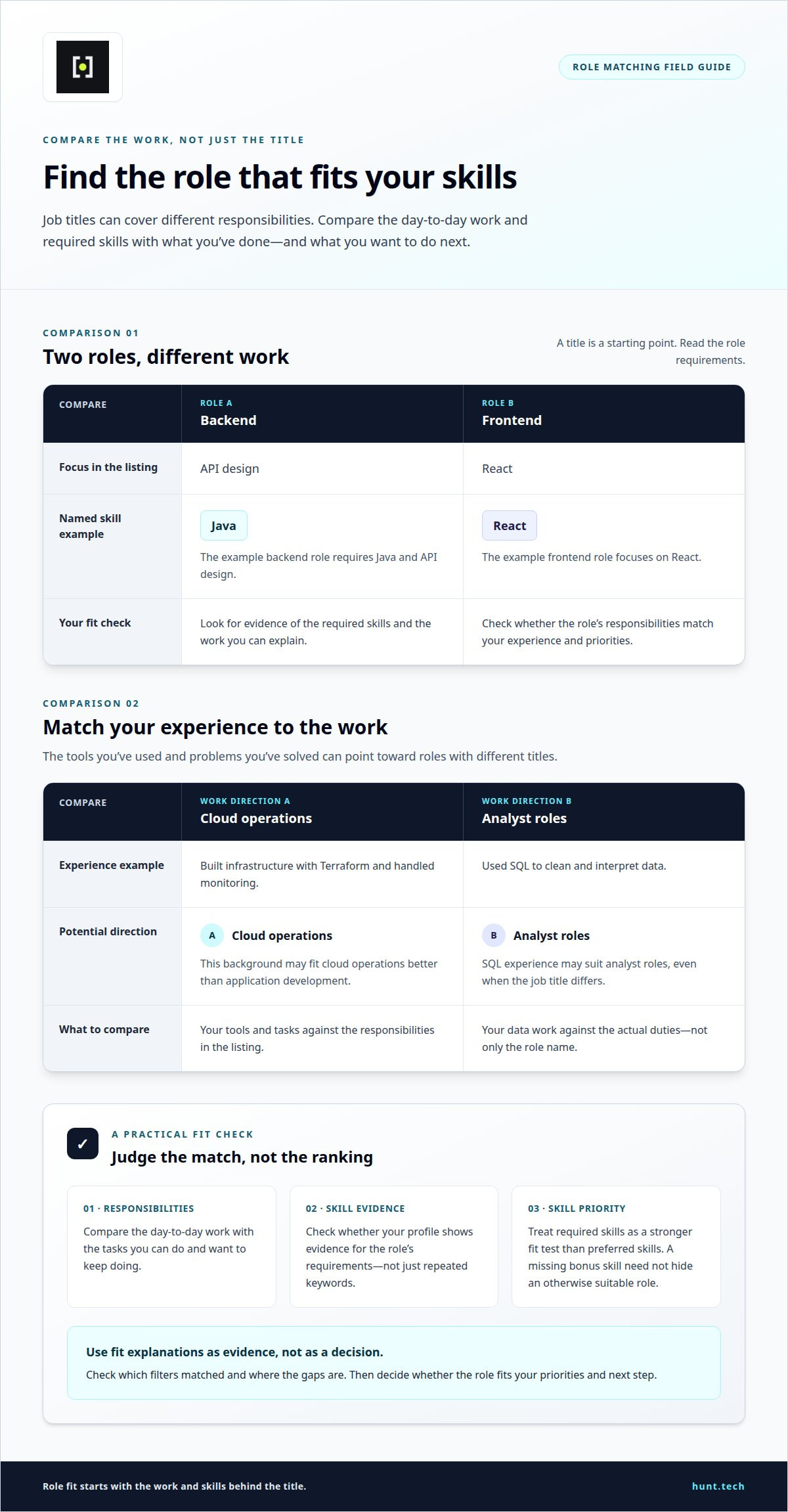
A match should compare role requirements with evidence in your profile, not just repeated keywords. For example, a backend role requiring Java and API design differs from a frontend role focused on React. The service should distinguish required skills from preferred ones, so a missing bonus skill doesn’t hide an otherwise suitable role.
Read the fit explanation before acting. It should identify matched filters and gaps, allowing you to judge the ranking rather than treat it as a decision.
Match Tech Roles to Your Skills
Start with the work you can do, not the job title you expect to hold. List the tools you’ve used, problems you’ve solved, and tasks you want to keep doing. To filter tech job listings effectively, compare those skills with each role’s duties. A title like “cloud engineer” can cover infrastructure, deployment, or reliability work, so check the day-to-day responsibilities against your experience.
Separate core skills from supporting ones. If you’ve built infrastructure with Terraform and handled monitoring, cloud operations may fit better than application development. If you’ve used SQL to clean and interpret data, analyst roles may suit you even when the titles differ. As you filter tech job listings, weigh skill match against your next step. A role can draw on your strengths while giving you room to learn a preferred tool. Treat required skills as a stronger fit test, and judge the work itself, not just the title.
Prepare Your Application for a Tech Role
Once a listing matches your skills, shape your application around its stated needs. Move relevant tools, projects, and outcomes near the top of your resume. For a backend role, describe an API you built, the decisions you made, and how you tested it. Keep every claim grounded in work you can explain in an interview.
Knowing how to filter tech job listings helps you decide which roles merit a tailored application. Tailor your summary and supporting details, not your entire work history. If a listing calls for cloud deployment and monitoring, show where you handled those tasks. Use the employer’s wording when it fits, but don’t claim skills you lack. A clear match matters more than a long list of keywords.
Once you’ve filtered tech job listings, use the fit to shape role-specific answers from your experience. Describe a decision you made, the work you owned, and what you learned. Application preparation can help tailor a resume and draft answers, but review every detail for accuracy. Keep examples consistent across your resume and answers so your experience comes through clearly. Edit the wording to sound like you, then decide what to submit.
Use the Hunt Android App to Discover and Track Roles
Hunt’s Android app supports job discovery and tracking, helping you review relevant roles and keep your search organized. Listings come directly from employers’ official careers pages. Set filters for your preferred title, compensation, location, and tech stack. Fit explanations show why each role appears, so you can assess how its requirements align with your experience and priorities.
For example, a role may match your preferred tech stack but fall short of your location or compensation preferences. Read the fit details before deciding whether to shortlist it. Tracking keeps potential roles organized as your search continues, without treating every listing as an immediate application.
For roles you choose to pursue, Hunt can prepare a tailored resume and draft answers. Review the materials, make your own edits, then follow the link to the company’s application page. Hunt does not submit applications for you. You remain in control of what you send and when.
Hunt
Hunt brings together tech job discovery and tracking, with listings sourced directly from employers’ official careers pages. Set preferences for title, compensation, location, and tech stack, then review matched listings and their fit explanations. Hunt matches tech roles to your stated skills and helps you prepare for roles you choose to pursue. This can make your search easier to manage when broad results include openings that miss your priorities.
Hunt AI supports your search using your criteria. For a role you select, application preparation can provide a tailored resume and draft answers. Review the materials, make sure they reflect your experience, and edit them yourself. Hunt connects you to the company’s application page; you decide whether and when to apply.
Use Hunt when you want help finding, assessing, and tracking potential matches while keeping decisions and submissions in your hands. If you want help with your search, contact Hunt.
